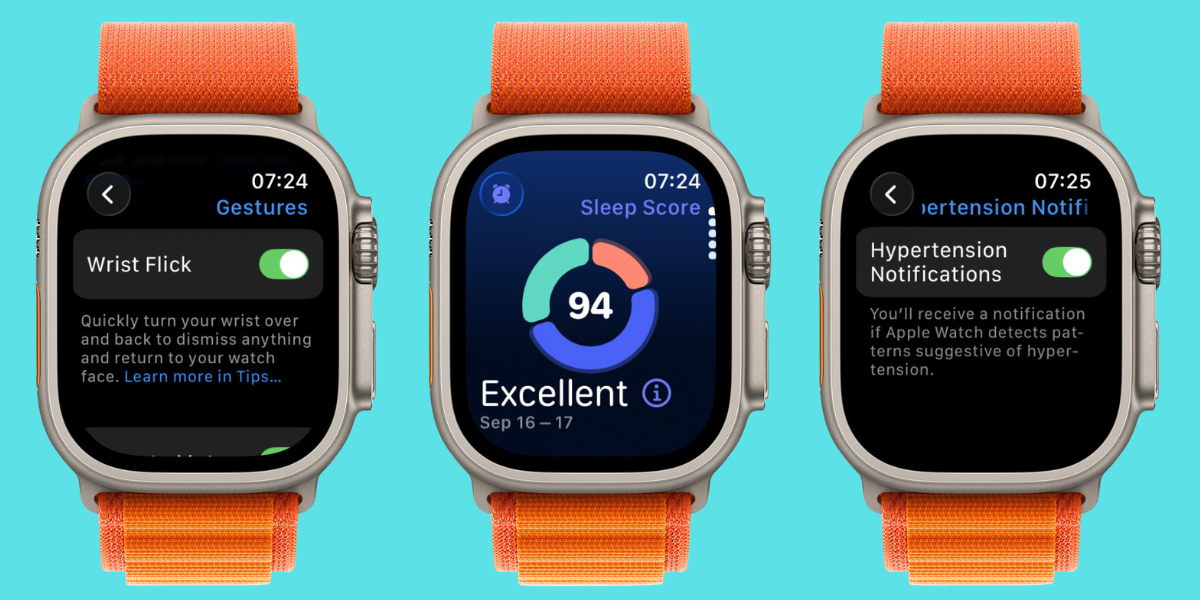
Hey, Insider! watchOS 26 is officially here, and it comes with some new features that we didn’t expect. If you have an Apple Watch Series 9 or later (including Apple Watch Ultra 2), then you can already experience the brand-new Sleep Scores feature. And soon, you’ll even be able to turn on hypertension alerts!
iPhoneLife Logo
On The Watch ⌚
Everything Apple Watch: Tips, News, Deep Dives, Apps & Gear

Editor's Note

Hey, Insider! It’s Olena here.

watchOS 26 is officially here, and it comes with some new features that we didn’t expect. If you have an Apple Watch Series 9 or later (including Apple Watch Ultra 2), then you can already experience the brand-new Sleep Scores feature. And soon, you’ll even be able to turn on hypertension alerts!

Happy Reading!

Olena Kagui's picture
Olena Kagui,
On the Watch Editor at iPhone Life
IN THIS EDITION

  • Tips - Silence your notifications hands-free! 👌
  • Trivia - Which phone came out at the same time as the first Apple Watch? 📱
  • Deep Dive - New watchOS 26 features are here! 🎉
  • Health Challenge Update - You can still join our September Challenge! 🏆
  • Fun and Interesting Tidbits - iPhone users report tilted apps! 🥴
🔥🤯 APPLE WATCH TIPS

Quickest way to silence notifications.

🎭 Use Theater Mode to dim and silence your watch.

👍 Feel safer with emergency contacts.

🏆😎 Trivia

Apple loves to announce its new devices in the fall. In fact, the first Apple Watch was announced on September 6, 2014. Which iPhone model was announced alongside it?

  • 🍁 The iPhone 5
  • 🍁🍁 The iPhone 5s and 5c
  • 🍁🍁🍁 The iPhone 6 and 6 Plus
  • 🍁🍁🍁🍁 The iPhone SE

🏆 Did you get it right? Scroll down to find out! 🏆

🌊🤿 DEEP DIVE: Download watchOS 26 & Try These Top Features

watchOS 26 is finally here! Have you updated your watch yet? Not only does watchOS 26 introduce a new design that makes all updated Apple devices look more consistent, but it comes with exciting new features, including Workout Buddy, Wrist Flick, smarter Widget Stacks, Sleep Score, hypertension detector, and the option to change the duration of your alarm clock’s snooze!

1. How to Get watchOS 26

You can download watchOS 26 directly on your watch or using the Watch app on your iPhone. Just go to Settings, Software Update, and update to watchOS 26. Please keep in mind that it can take up to two hours, and your watch should be on its charger throughout the process. You won’t see the option to install watchOS 26 until you update your iPhone to iOS 26, so make sure to do that first.

2. My Favorite watchOS 26 Feature

Initially, I was the most excited about Workout Buddy, but I didn’t enjoy it as much as I thought I would (I’ll tell you why a bit later). Instead, my favorite feature is the ability to change the alarm’s snooze time, which can be done on both iPhone and Apple Watch while setting up an alarm. My second favorite feature is Sleep Score, and it wasn’t announced until the September 9 Apple Event. Sleep Score looks at all your sleep data and gives you an overall score depending on how long you spent in bed, how much of that time you slept, and how many interruptions you experienced. While Apple Watch has always tracked sleep, I like seeing Sleep Score’s more comprehensive data and understanding how my sleep was overall.

3. My Least Favorite watchOS 26 Feature

Workout Buddy is exactly what it sounds like. Rather than a coach that uses your Health data to help you reach fitness goals, it gives you less helpful advice and will comment on how you are doing, saying things like, “our pace is (blank).” I find this distracting rather than helpful, but you should try it out to see if you like it. I can see it being helpful if you want to exercise without having to glance at your watch to figure out your distance, time, pace, heart rate, etc.

4. Most Useful watchOS 26 Feature

The new hypertension alert feature works by using an algorithm that analyzes how your blood vessels respond to the beating of your heart via the optical heart sensor. After a 30-day period of readings, your watch will take the gathered data and send you an alert if any signs of consistent hypertension are detected. Any high blood pressure readings will be saved in your Health app, allowing you to easily share them with your doctor. While it hasn’t been long enough for me to test it out, I am excited to see what my Health app says about my blood pressure in about a month.

Have you tried watchOS 26 yet? How do you feel about the new features and the design change? Email OntheWatch@iphonelife.com and let me know!


👟💪 iPhone Life Health 👟 Challenge Update

Our September Challenge is in full swing—and you can still join! Even if you’re a bit late to the party, the free Challenges app will give you points for all the exercises your watch has recorded this month. You can join until September 23rd! The monthly iPhone Life Challenge is a great way to come together as a community and motivate each other to reach our health goals by staying active. We’ll be doing a weekly accountability post for premium subscribers in our Insider Facebook group to share struggles, trade tips, and support each other on our journeys.

To join the challenge, download the free Challenges app on your iPhone and enter the code VUUR when prompted. Need help? This article explains the steps and tells you more about the app.

Are you enjoying the challenge? Do you have any suggestions for how we can make it even better? Email OntheWatch@iphonelife.com and let me know.

🥇 CHECK YOUR TRIVIA ANSWER 🥇

The correct answer is: 🍁🍁🍁 The iPhone 6 and 6 Plus

The first Apple Watch launched alongside the first models introduced to the iPhone 6 line (the 6s and 6s Plus launched the following year). This batch of new devices also saw the first Plus model, the iPhone 6 Plus.

🕺📰 OTHER FUN AND USEFUL TIDBITS

Missed the most recent editions? Now you can go back and read them!

FIRST TIME READING?

Sign up here to get the On the Watch newsletter in your inbox every other week.

Follow iPhone Life

iPhoneLife Logo
Copyright © 2025 Mango Life Media LLC. All Rights Reserved.
Mac, iPad, iPhone, Apple TV, Apple Watch, AirPods, macOS, iPadOS, iOS, watchOS, and Apple are all trademarks of Apple, Inc.
You have opted in to receive this email from iPhone Life magazine: Insider Daily Email
To stop receiving these emails, you may:
Mango Life Media LLC | 2280 W Tyler Ave Suite 205 | Fairfield, IA 52556