|
On The Watch ⌚
|
|
Everything Apple Watch: Tips, News, Deep Dives, Apps & Gear
|
|
|
Hey, Insider! It’s Olena here.
Your Apple Watch can likely take an EKG reading, but what exactly does that mean? And what is the best way to use this heart-health feature? Learn all about how to take an accurate EKG reading and how often you should do it.
Happy Reading!
|
|
|
|
Olena Kagui,
On the Watch Editor at iPhone Life
|
|
|
|
|
|
- Tips - Get watch alerts when you fall. 🤕
- Trivia - What will Apple call the latest watchOS? ⌚
- Deep Dive - How often should you take an EKG? ❤️
- Health Challenge Update - You can still join our September Challenge! 🏆
- Fun and Interesting Tidbits - New Apple products coming soon! 💻
|
|
It’s almost time for the annual watchOS update! This year, Apple has changed its naming conventions for new OSes, so the new Apple Watch software won’t be watchOS 12 like we were expecting. What is the name of the upcoming watchOS version?
- 🕝 watchOS 25
- 🕝🕝 watchOS 26
- 🕝🕝🕝 watchOS Tahoe
🏆 Did you get it right? Scroll down to find out! 🏆
|
|
|
|
|
🌊🤿 DEEP DIVE: Apple Watch EKG/ECG—When & How to Use It
|
|
|
|
If you have an Apple Watch Series 4 or later, then you’ve been carrying a mini electrocardiogram (EKG/ECG) machine on your wrist! Unfortunately, existing Apple Watch SE models do not have the EKG features. However, Apple will be announcing a new Apple Watch lineup this upcoming week, so we’ll see which new models have this heart-health feature.
How to Use the EKG/ECG Feature Properly
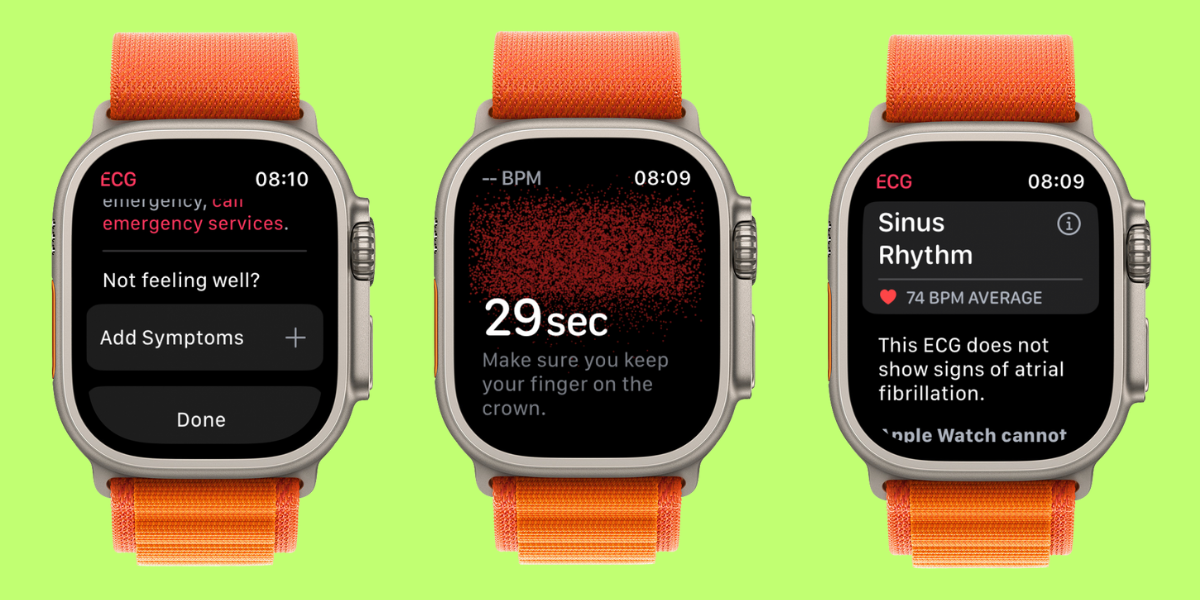
Taking an EKG reading on your Apple Watch is really simple, but there are a few steps to take to make sure your reading is as accurate as possible. Step one is to tighten your strap so that the sensors on the back of your watch are flush with your skin. Next, press the Home button on your Digital Crown to see your collection of apps. Select the white EKG app icon with a red heart reading squiggle. Then, place your dominant hand’s pointer finger against the Digital Crown and hold it still and firm while your watch takes the reading. If you move too much, it will tell you to try again. Once the reading is done, you will be able to see the results on your watch screen. The results will also appear in your Health app so that you can share them with your doctor.
What Can an Apple Watch EKG Reading Reveal?
It is important to understand that there are limitations to what an at-home EKG reading can tell you about your heart health. This feature can read your heart's rhythm and detect any irregularities that might indicate atrial fibrillation (AFib) while letting you take note of any additional symptoms you want to record. However, you should always consult with a doctor if you have any questions, doubts, or strange readings. Similarly, if your readings say you are healthy but you feel like something is off, do not hesitate to get checked out. Having these watch readings, especially collected over a long period of time, can help a doctor to diagnose you, but they are not a substitute for the guidance of a medical professional.
How Often Should You Do an EKG Reading?
It can be tempting to take regular EKGs, especially because it is so easy and quick. However, doing too much can lead to anxiety and even a phenomenon dubbed "ECG paranoia," which will affect your reading even if you don’t have medical problems. General practitioners may have a healthy adult take an EKG reading once every 4–5 years. Those with pre-existing heart conditions or symptoms such as shortness of breath, dizziness, chest pain, or heart palpitations may need to get an EKG more often. It is also important to note that there are several types of EKGs, including ones that are worn for up to 48 hours, so a quick Apple Watch reading may not be sufficient to understand what is going on in your own body. You may want to take a reading whenever you feel like you are experiencing an irregular heartbeat, unexplained fatigue or weakness, or the other symptoms mentioned earlier. Taking a quick EKG when you’re experiencing symptoms can help gather information for your doctor. Make sure to use the Health app to record notes about your symptoms along with your reading!
Have you tried taking an EKG on your Apple Watch? Did it help you get a better understanding of your heart health? Email OntheWatch@iphonelife.com and let me know!
|
|
|
|
|
👟💪 iPhone Life Health 👟Challenge Update
|
|
|
|
Our September Challenge is in full swing—and you can still join! Even if you’re a bit late to the party, the free Challenges app will give you points for all the exercises your watch has recorded this month. The monthly iPhone Life Challenge is a great way to come together as a community and motivate each other to reach our health goals by staying active. We’ll be doing a weekly accountability post for premium subscribers in our Insider Facebook group to share struggles, trade tips, and support one another on our journeys.
To join the challenge, download the free Challenges app on your iPhone and enter the code VUUR when prompted. Need help? This article explains the steps and tells you more about the app.
Are you enjoying the challenge? Do you have any suggestions for how we can make it even better? Email OntheWatch@iphonelife.com and let me know.
The top 20 users of the August challenge are:
- Tanksi T - 3,038 pts
- Keith M - 3,000 pts
- charliedornbos - 2,989 pts
- rspoe52 - 2,574 pts
- tiabella192 - 2,404 pts
- rmele - 2,403 pts
- bailey.becky07 - 2,303 pts
- jeshortmd - 2,265 pts
- Icraft464 - 2,230 pts
- Steve R - 1,989 pts
- Karen - 1,975 pts
- H Sonne - 1,754 pts
- Helen K - 1,717 pts
- margieplough - 1,717 pts
- kittykat_gu - 1,682 pts
- Mumja Jo - 1,673 pts
- Karen M - 1,652 pts
- hmbeggs - 1,631 pts
- humane.corned.0x - 1,627 pts
- Mike C - 1,531 pts
|
|
|
|
|
🥇 CHECK YOUR TRIVIA ANSWER 🥇
|
|
|
|
The correct answer is: 🕝🕝 watchOS 26
Apple has unified its naming convention to align all software updates with the number of the upcoming year, much like car manufacturers do. So, this year, we’ll be seeing iOS 26, watchOS 26, iPadOS 26, and macOS 26 (also known as Tahoe).
|
|
|
|
🕺📰 OTHER FUN AND USEFUL TIDBITS
|
|
|
|
Missed the most recent editions? Now you can go back and read them!
FIRST TIME READING?
Sign up here to get the On the Watch newsletter in your inbox every other week.
|
|
|
|
|
Were these Apple Watch tips helpful?
With your feedback, we can improve the On the Watch newsletter. Let us know how we did:
|
|
|
|
|